
How to Reset Your Password
If you are a new member, forgot your password or are unsure if you have an account, follow these steps to reset your password.
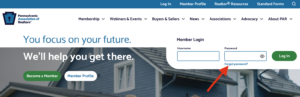
- On the homepage, click “forgot password.“
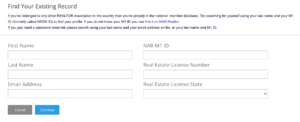
- Complete the fields in the “Find Your Existing Record” box. You must include your first and last name and either your NAR M1 ID or email address to complete a search.
- If your record is found, click “Continue” to process the password reset email. Be sure to check your junk folder if you do not receive the email in your inbox.
- Follow the instructions in the email to reset your password. There are no length or character requirements for your new password.
NOTE: If you checked your junk folder and still have not received the password reset email, you may need to update the email address associated with your account.
